ANAF status changed?
You'll know first.
Billyou monitors the ANAF register daily for every client and vendor you work with and for your own company. Important changes appear in your account as notifications. No manual lookups, no surprise fines.
- Critical 2 min agoVendor radiatedAcme Solutions SRL
- Warning today 06:14VAT lostBeta Logistics SRL
- Informational yesterdaye-Invoice enrolledGamma Trade SRL
Tax risk doesn't call ahead
A single invoice issued to a radiated, non-VAT or inactive company can trigger rejected deductions, corrections and penalties. Most of the time you find out when ANAF sends the assessment.
What we track, automatically
6 types of change tracked daily, plus the warning when you invoice and correct Bucharest sector addresses.
VAT registration gained or lost
You know by the next morning if a vendor has dropped out of the VAT register. Avoid rejected deductions on invoices issued after that date.
Company declared fiscally inactive
Transactions with a fiscally inactive company are invalid for expense deduction. You get a notification in your account, and again when the company is reactivated. An inactive client gets the Inactive badge.
Invoicing a struck-off company
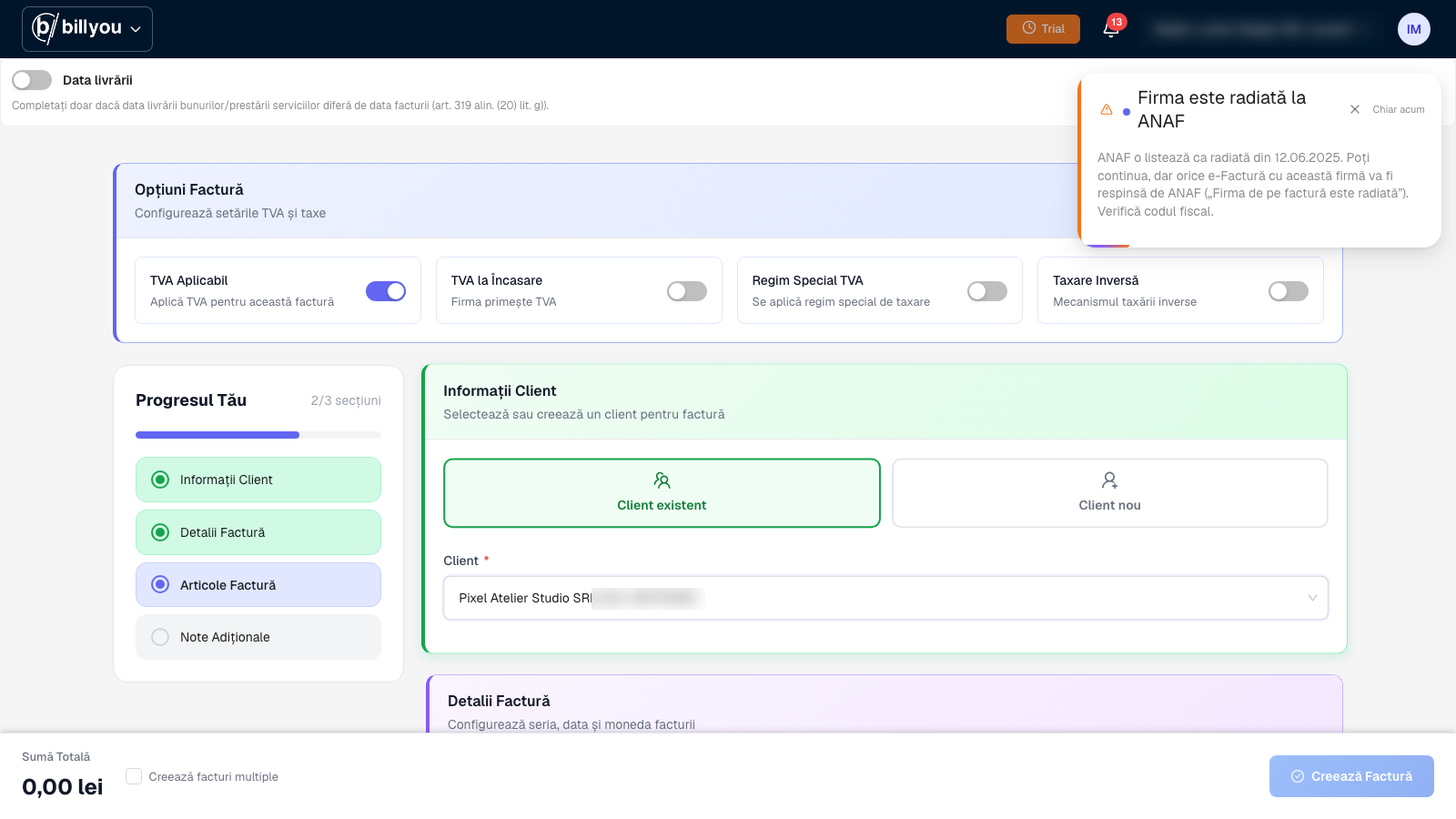
When you invoice a client that has been struck off, Billyou warns you that ANAF will reject the e-Invoice.
Company removed from the trade register
When a partner ceases to legally exist, an invoice issued to them becomes unusable. You find out immediately, not three months later.
Split VAT status change
Paying under the wrong fiscal regime triggers corrections and interest charges. We flag any change in a vendor's regime.
e-Invoice enrolment change
You find out when a vendor joins or leaves the e-Invoice register, so you know how their invoices will reach you.
Correct Bucharest sector addresses
For companies in Bucharest, the sector in the address comes straight from ANAF data, so the invoice passes e-Invoice validation.
How it works
Zero setup. Every step happens in the background.
Daily check
Every night, Billyou queries the ANAF register for the clients and vendors in your account and for your own company. When you add or edit a client, it is checked on the spot. Zero effort on your side.
Notification in your account
Every change arrives as a notification in your account. For your own company you also get an on-screen message, so it doesn't slip by.
Alert in context
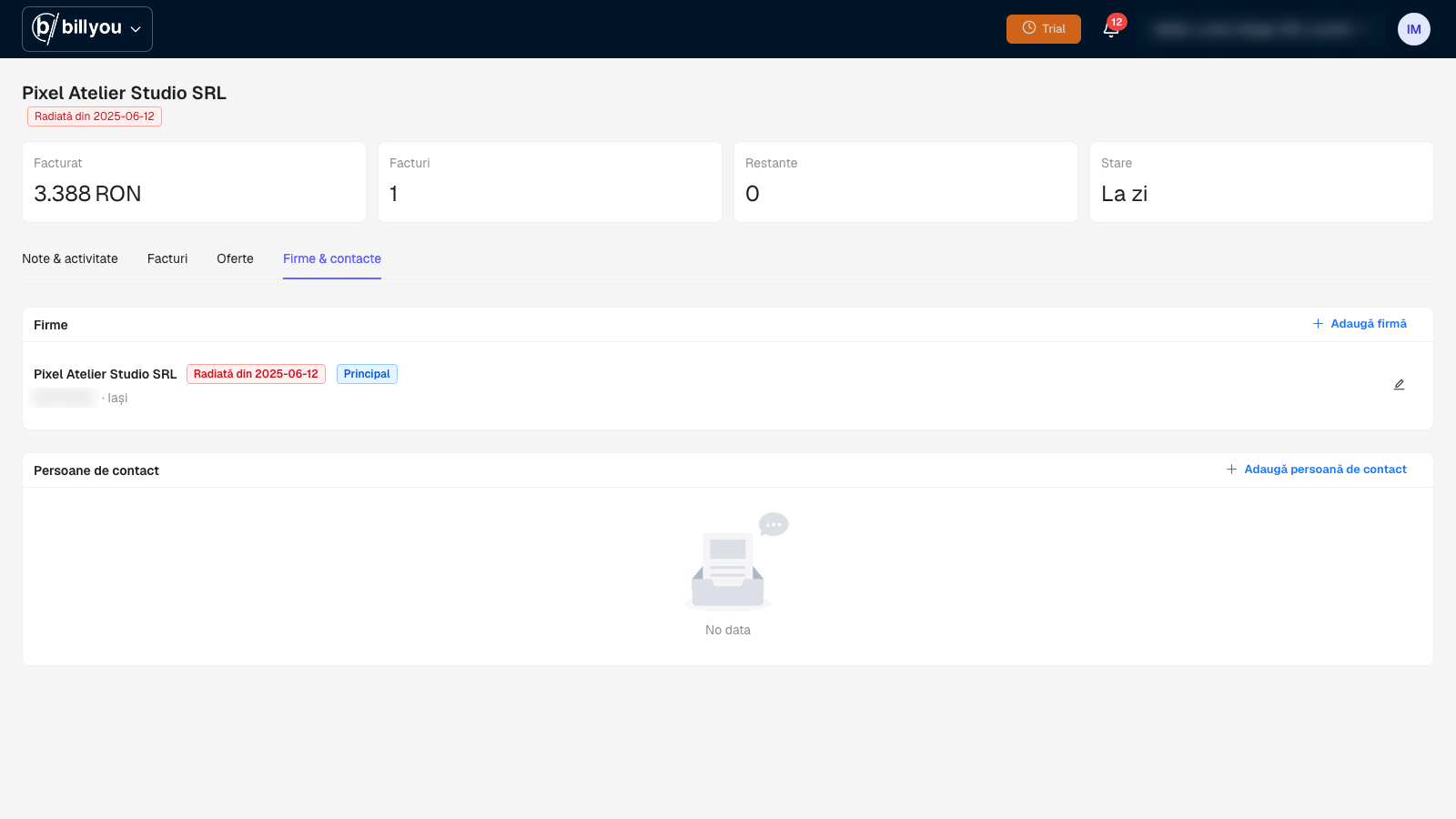
Every notification names the company affected. For clients, a Struck off or Inactive badge appears next to the name on the client page.
For you and your accountant
Alerts about your own company include a recommendation to contact your accountant, before it becomes a problem.
Three kinds of alert. Three kinds of action.
The difference between fixing things in time and explaining them to an auditor after the fact.
Changes on your own VAT ID
If ANAF changes your status, you're the first to know, not the last. The alert includes a direct recommendation: contact your accountant before it turns into penalties.
- Immediate in-app notification
- Recommendation to contact accountant
- Context and suggested next steps
Changes on the companies you buy from
See immediately which recorded invoice risks being rejected for deduction. The alert links straight to the affected vendor in your expense list, so you can decide before the next payment goes out.
- Direct link to vendor in expenses
- Invoice history for that VAT ID
- Informed decision on future transactions
Changes on the companies you invoice
When you invoice a client that has been struck off, Billyou warns you that ANAF will reject the e-Invoice.
- Struck off or Inactive badge next to the client name
- Warning in the invoice form
- Notification when a client is struck off, declared inactive or reactivated
ANAF status, right on the client
The struck-off badge shows on the client page, next to their name and on every company in their group.
We warn you, the decision stays yours
When you pick a struck-off client, Billyou tells you since when ANAF lists them as struck off and that an e-Factura to them will be rejected. You can continue if you know ANAF's data is wrong.